
Docordia by KP Soft Tech
Document control (DCC) and QMS software
Every document has an owner, a route and a record.
Docordia helps document controllers and quality managers issue, approve, distribute and keep evidence for each step in one place, extending into NCR and CAPA. It runs in the web browser, with a Thai and English interface.
Is quality paperwork still living in binders, shared folders and email?
The problems document controllers and quality managers meet most when documents are scattered.
Withdrawn version in use, NC raised
The shop floor picks up a form or work instruction that was already withdrawn, and the auditor raises an NC.
Approvals nobody can find
They travel by email and paper, nobody knows whose desk they are on, and every one needs a phone call.
Duplicate document numbers
Numbers come from hand or a spreadsheet: duplicates, gaps and different formats in every department.
No proof when the auditor asks
There is no record of who opened, downloaded or printed a document.
Findings live in separate files
NCRs, CAPAs and internal audit results are not linked to the documents that need changing.
PDPA without a plan
Documents and forms hold personal data, but there is no clear way to handle it under the PDPA.
Docordia modules
Grouped into document control, quality and security. Every package includes every module. Items marked "In development" are not available yet.
Document control (DCC)
New documents with automatic numbering
Create documents with a step-by-step wizard; the system reserves a unique number
Revision control
Every revision keeps its history and can be compared; issued files cannot be overwritten
New revisions take effect on final approval
The current revision stays valid while the new one is pending and is retired only when the new one is approved
Approval workflow designer
Drag and drop approval routes, dry-run them, then publish as a version
Approval queue, inbox and delegation
Approvals land in the right person's queue, with delegation while they are away
Distribution and acknowledgement tracking
Send approved documents to the right people and see who has acknowledged them
Individual acknowledgement and distribution lists
Record acknowledgement per person, with reusable distribution lists and deadlines
Document search
Search with keywords and layered filters, and save searches for reuse
Tracking board and SLA timers
See who is holding each task, for how long, and whether it is at risk of being late
Automatic escalation
Rules that remind and escalate overdue document approvals, acknowledgements, DARs and periodic reviews
Periodic document review
Owners are reminded when a document is due for review
Document action request (DAR)
Request new, revised or withdrawn documents through an approved form
PDF watermarks
Stamp a watermark into PDF files on download or print
Download and print log
Every download and print is logged with who and when
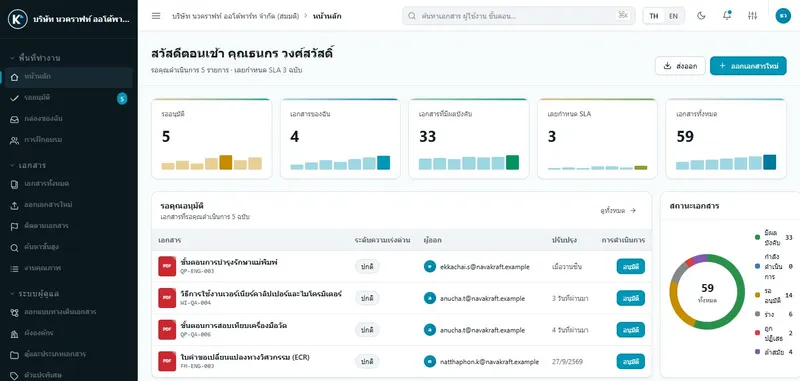
Dashboard
Your pending work and a live overview of documents
Reports and scheduled email
Build reports in 6 steps, schedule them and email them automatically
Organisation master data
Org chart, cabinets, document types, variables and working calendar in one place
Smart Controls (automatic checks)
Configurable rules that catch duplicates, missing data and personal data
Security and PDPA
4-layer permissions (RBAC)
Control who sees and does what, down to cabinet and document type
Tamper-proof audit trail
Every change and every access to sensitive data is logged, with no edit or delete button
Built-in PDPA tools
Consent records, data subject request (DSAR) queue, retention and destruction policies, and legal hold
- In development
Two-step verification (TOTP)
Codes from an authenticator app on top of the password
Separation between organisations
Each organisation's data is kept separate, verified by cross-organisation tests
Web application protection
Security headers, rate limiting and CSRF protection
Backup and restore drills
A backup procedure with a completed restore drill
Void quality record attachments with a reason
Wrong attachments are voided with a reason instead of disappearing
Quality management (QMS)
Quality hub and My tasks
NCRs, CAPAs and findings share one structure, with all your tasks in one place
NCR, containment and MRB
Record nonconformities, contain them and decide through the MRB
Concession / Deviation
Request concessions or deviations with approval and a record
CAPA / 8D
Structured corrective and preventive action, from root cause to effectiveness check
- In development
Quality reports and dashboard
NCR/CAPA overview and quality record retention
- In development
Internal audit
Plan risk-based audits, record findings and close reports
People register and training requirements
Define which roles or people need which training
Skill matrix and annual training plan
See skill gaps across the organisation and plan annual training from them
Courses, sessions, attendance and certificates
Run sessions, take attendance, record results and issue certificates
Training when documents change
When a new revision takes effect, the right people are assigned to read or train, linked to acknowledgement
- In development
Exams
Post-training exams
- In development
Personal qualifications and internal auditor pool
Record qualifications with expiry dates and use them to pick internal auditors
- In development
Overdue training reminders and escalation
Remind people with overdue training and escalate to their manager
- In development
OJT and training effectiveness
OJT sign-off and training effectiveness evaluation
- In development
Training on role change
When someone changes role, the system assigns what they need to learn
- In development
Supplier management (ASL, scorecards, SCAR)
Supplier register and approved list, supplier certificates, periodic scorecards, SCAR, supplier audits and reports
From a quality problem to a new revision and training
Documents and quality work are linked in one system, so nothing has to be chased across files.
- 1
NCR and containment
Record the nonconformity, contain the parts and decide through the MRB.
- 2
CAPA / 8D
Analyse the root cause, set preventive actions and check effectiveness.
- 3
Document action request (DAR)
Hand the CAPA over as a request to change the related work instructions.
- 4
New revision takes effect
The new revision takes effect at final approval and the old one becomes obsolete.
- 5
Training assigned
Reading or training is assigned to the people concerned when the new revision takes effect.
Why Docordia
The current revision is always clear
Every revision is kept and can be compared. Issued files cannot be overwritten.
Approval routes that match how you work
Design your own routes, dry-run them, then publish them as versions. No need to reshape the company around the software.
Evidence that cannot be edited
The usage log has no edit or delete button, and it includes downloads and prints.
Permissions down to the document cabinet
Four permission layers let you show the auditor why a person could approve a document.
PDPA built in
Consent records, a data-subject request queue, retention and disposal rules, and legal hold.
Documents and quality work are linked
NCR → CAPA → document action request → new revision → training assignment.
Clear prices, no quote needed
Package prices are published on the website and quality management (QMS) is included in every package.
Can be installed on your own servers
Organisations that must keep their data in-house can install it on their own servers. The SaaS packages are in development.
Real screens from the system
Captured with sample data from a fictitious company.
Document register: status, numbers and filters on one screen
Design approval routes by drag and drop, then dry-run them before going live
Tracking board: see at once which stage work is stuck in
Approve, return for changes or put on hold, with a reason recorded every time
CAPA in 8D format, from root cause to effectiveness check
Skill matrix: who needs to know what, and who has been trained
Usage log including downloads and prints
Approve from a phone browser, with nothing to install
Your data is isolated, auditable and governed by the permissions you set
Designed along ISO 9001 and ISO/IEC 27001 guidelines.
Isolation between organisations
Each organisation’s data and files are isolated, and cross-organisation tests run before every release.
Four permission layers
Roles, permission groups, cabinet or document-type permissions and contextual permissions, re-checked on the server every time.
A usage log that cannot be edited or deleted
Including document views, downloads and prints.
Web application protection
Security headers, rate limiting and CSRF protection.
Backups with tested restores
A backup procedure whose restore has actually been rehearsed.
Performance test results
Tested at 10,000 documents per organisation: P95 dashboard 32 ms, document list 50 ms, search 156 ms.
SaaS or on-premise
Both include every DCC and QMS module.
| SaaS | On-premise | |
|---|---|---|
| Suited to | Organisations with up to 199 user accounts | Organisations with 200+ users, or that must keep data on their own servers |
| Pricing | Monthly price, choose your billing term (see pricing) | One-off licence: contact us directly |
| Who runs the server | KP Soft Tech | Your IT team, with installation and operations manuals |
| Updates | Applied by KP Soft Tech | On an agreed schedule |
| Status | In development | Available |
Prices exclude 7% VAT. Every active user account counts, whatever its role.
Frequently asked questions
See Docordia working with your documents
Fill in the form and we will email you demo access right away. Our team can also walk you through issuing, approving and the evidence auditors ask for.