
SAFEFLOW by KP Soft Tech
Permit to work software that knows when to say “not yet”
Safety rules are enforced on the server, not just on the screen.
SAFEFLOW is a bilingual (Thai and English) permit to work system for high-risk work. If isolation (LOTO) is incomplete, work cannot start. If jobs overlap in an area, the clash is caught at submission. If a gas reading becomes critical, the permit is suspended. And it can be installed on your own servers.
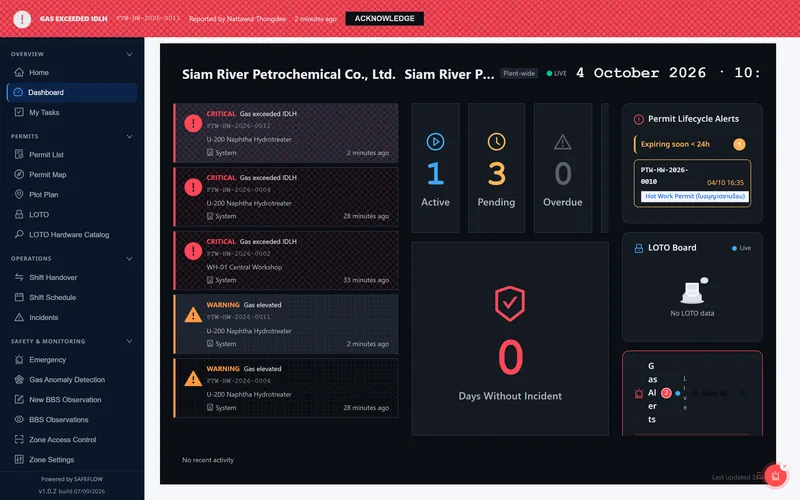
Paper permits make it too easy for risky work to start
What happens on site while permits are still on paper.
Signed after the fact
Approvers can be skipped, and closed permits can be edited again.
Isolation is just a signature
Someone signs that isolation is done, but nobody checks every lock point or knows where the padlocks are.
Clashing jobs go unseen
Welding happens next to a line break or a confined space entry, and nobody sees everything happening in the zone.
One gas test, first thing in the morning
Nobody tracks the re-tests, and the results sit on easily lost paper.
The permit is gone when it matters
After an incident nobody can prove who approved what and when.
Expired certificates slip through
Contractor certificates expire without anyone noticing, and shift handovers happen by word of mouth.
Three gates the system will not let you skip
SAFEFLOW does not just record permits. It refuses work that is not yet safe.
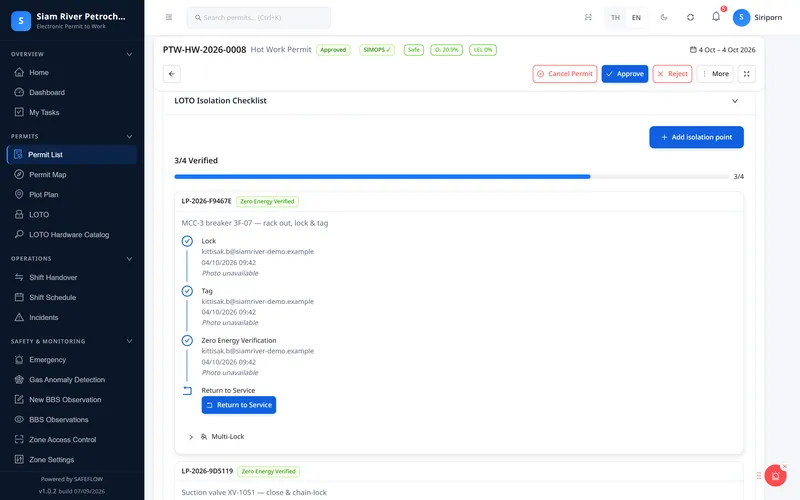
LOTO · 3/4 → ✕
Isolation incomplete: work cannot start
Every lock point must be confirmed, by scanning the QR code at the point, before the “Start work” button becomes available.
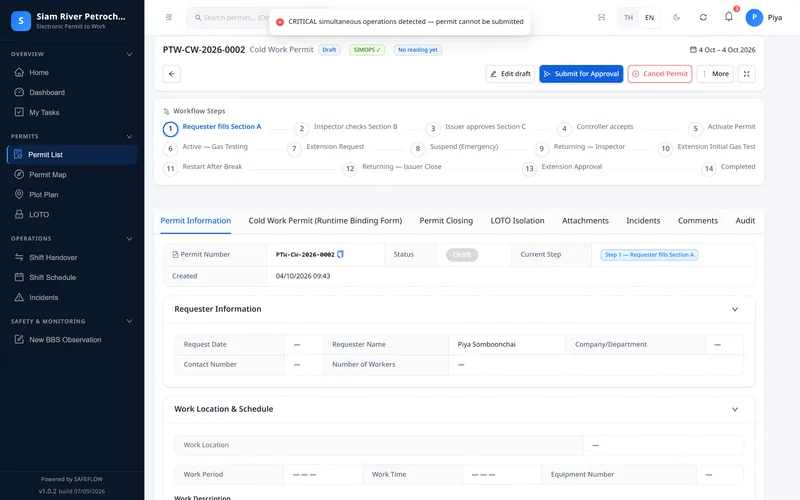
SIMOPS · submit → ✕
Overlapping work is caught at submission
Hazardous jobs that clash in the same zone, such as hot work next to a line break, are blocked at once. For warnings, the requester must acknowledge and the reason is recorded.
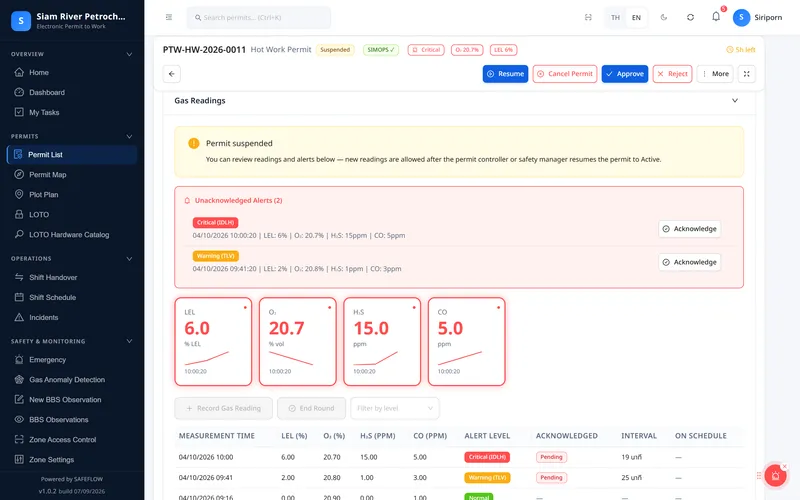
H₂S ≥ 10 ppm → suspend
Critical gas: the system suspends the work
When a gas reading entered during the job reaches the critical level, the permit is suspended and people in the zone are notified. Work resumes only after a passing re-test.
Turn your own paper forms into digital forms yourself
Build forms by drag and drop, design your own approval steps, link forms to permit types and decide who fills in which field at which step. The PDF follows your original layout and carries a verification QR code. The Hot Work form already runs end to end.
A form you built, as the requester sees it
Drag-and-drop form builder: no waiting for a developer to change a form
Hot Work approval steps, designed in the workflow designer
SAFEFLOW modules
What the system does today. Items marked "In development" are not available yet.
Permits and safety
Permit to Work
Submit, multi-step approval, e-signatures, extensions, close-out, attachments and PDFs in your own layout with a verification QR
LOTO and lock register
Isolation point register with on-site QR codes, lock register and confirmation of every point before work starts
4-level gas testing
4-level readings and re-test schedule; no passing reading means no start, and a critical reading suspends work
SIMOPS conflict checks
Checked on the server at every submission; critical conflicts are blocked, warnings need an acknowledged reason
Emergency stop · JSA · Toolbox talk
Stop work across a site or zone, 5×5 risk assessment and toolbox talk records
- In development
Hazard and PPE suggestions
Rule-based hazard and PPE suggestions from job keywords, and pre-fill from similar past permits
Configuration and reporting
Form Builder + Workflow Designer
Drag-and-drop forms, approval flow design, form-to-permit-type wiring and per-field permissions
Dashboards · Monitoring Wall · Reports
Overview dashboard, control-room wall, safety KPIs and scheduled custom reports
Users, permissions and hash-chained audit
Organisation-defined roles and permissions, and a hash-chained activity history you can verify
- In development
Integrations
API keys for integrations and zone-level positions from RTLS systems
Contractors and field work
Contractors and workers
Register, documents, insurance, worker certificates with expiry alerts, and online safety induction with a quiz
Inspections · Incidents · BBS
Inspection schedules, checklists, QR stickers, incident reports with CAPA and behaviour observation cards
Shift handover · Delegation · Notifications
Handover log, shift roster, approval delegation and bilingual in-app and email notifications
- In development
Site plan and map
2D site layout coloured by active work, and zone check-in by QR
Who SAFEFLOW helps
The main users, and often the ones who start the purchase
- See all work in progress across the whole site on one screen
- Know at once when a recorded gas reading crosses a threshold
- Have evidence ready for audits; designed to support ISO 45001 clause 8.1
Contractor, Requester
- Fill in forms in Thai or English that look like the paper ones
- See permit status without phoning anyone
- Take safety training online before arriving on site
Site Manager
- Safety KPIs and an overall dashboard
- Evidence for every step when an incident must be investigated
- Fewer permits that were signed but never actually carried out
Decide on installation and data security
- Install it on your own servers
- Fine-grained user permissions, with passwords stored hashed (bcrypt)
- An activity history you can verify has not been altered
On-premise · Thai and English · Verifiable
What IT/OT and safety teams ask us most often.
Runs on your own servers
Your data stays with you, with your logo and colours. Some parts, such as maps and email, still need internet access.
Thai and English
Every screen and error message exists in both Thai and English, and each user can pick their language.
Evidence you can prove was not altered
Every change is append-only and chained with SHA-256 hashes, with an integrity check for the chain. Permit PDFs carry a QR code to verify them.
Approval steps cannot be skipped
Permit status transitions are locked both in the application and in the database. Closed, cancelled or expired permits cannot be reopened.
Permissions you define
Set your own roles and permissions, invite users or create many users at once.
Contractors and shift handover
Contractor register, worker certificates with expiry reminders, shift handover records and a Monitoring Wall for the control room.
Real screens from the system
Captured at a fictitious site; all people, contractors and equipment tags are invented.
Active permit: every signer and the time remaining
Gas readings in four levels, with the next re-test due
Isolation point register with QR codes posted on site
SIMOPS matrix where admins define which jobs may not run together
Contractor readiness and certificates close to expiry
Closed permit: evidence for every step from submission to hand-back
Permit steps in a phone browser
Permit map (in development)
© MapTiler © OpenStreetMap contributors
Frequently asked questions
Request a SAFEFLOW demo
Fill in the form and we will email you demo access. Our team can also walk through the permit steps of your own site with you.